
Merge PDF Files Online
Merge PDF files easily. Upload multiple files or drop files in the box. Use the “Merge PDFs” button. It will show the master file below with a down arrow button at the top right of master file and you can download & save the Merged file.
How to merge PDF files
Combine separate PDFs into one document. Check the file order before you start.
- Choose two or more PDF files within the size limit shown above.
- Check the selected file list. The merged PDF follows that order.
- Start the conversion, then download the combined PDF.
How to Use
Step 1: Use the Upload Files button or drop your PDF files by dragging them into the box.
Step 2: Use the Merge PDFs Button after providing your files.
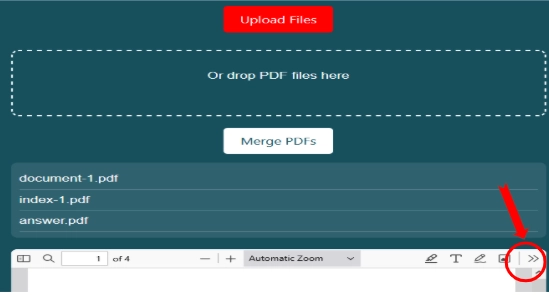
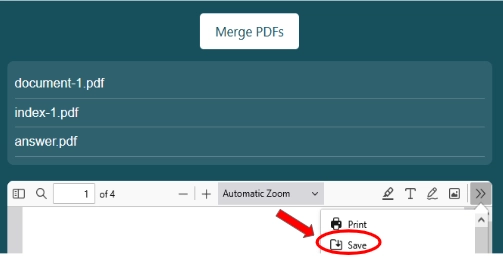
Step 3: It will show the merged master file below the button. You will see a double arrow menu option at top right of this merged file as shown above in image. Click on this menu.
Step 4: Now it will show save button as shown below in image and you can save the Merged file into your device.
iLovePDF PDF Merge
It is a versatile tool that simplifies combining multiple PDF documents into a single cohesive file. Working on PDF files but finding it tough to manage multiple PDF files? Just simply merge your files and make a single file for convenient management & file sharing. Whether for work or personal use, this efficient solution streamlines document management and sharing, enhancing productivity and organization with ease.
Merge PDF Online
This page has a specially designed PDF merger tool for online PDF merging. It is free to use tool that can potentially merge multiple files into a single one within seconds. All you need is to drag or upload files in the above-given tool and tap the “Save & Download” button to get your desired results.
Why Choose Online PDF Merge Tool?
It is an era of high speed on the internet where users want to do everything in seconds. Therefore if anyone is willing to merge PDF files then he has to go to the online PDF Merge tool instead of PDF merging apps. There are a lot of PDF merging apps and it takes a lot of time to select the best one. Moreover, downloading an app also consumes a lot of internet data. Hence, the online PDF tool is the best option for users. Here are some potential benefits of our online PDF Merge tool over different merging apps for PDF.
No Need to Download
When you have our online PDF tools then there is no need to download an app to merge your PDF files. It means less time & internet data consumption and fast & accurate results.
Fast & Accurate
This online tool merges PDF files much faster than any app designed for PDF file merging. Moreover, we use powerful techniques that produce accurate results without denting the quality of content.
Quality Maintained
We rely on AI-based quality tools that can potentially merge files in high quality. The quality of your content in PDF files will be maintained at a very high to give you perfect results.
100% Secure
We do not keep any of your file data on our servers. Moreover, we do not have any integration of third-party softwares or service platforms in our tools. It means your files and file data are 100% secure and no privacy breach in your PDF file content.
No Login or Registration
This platform does not require you to log in or register before using any tool. Hence you can start merging files without wasting your time in putting any login credentials.
100% Free to Use
This online Merge PDF tool and all other tools on this platform are 100% free to use.
Common questions and quick fixes
Can I merge PDF files in a different order?
The tool joins files in the order shown in the selected list. If the order is wrong, clear the selection and choose your files again. Use Organize PDF to rearrange pages afterward.
Why does my password-protected PDF fail to merge?
This browser tool needs an unlocked PDF. Open the document with the correct password and save an unlocked copy first. Only remove protection when you have permission.
Can I combine more than ten PDFs?
Choose up to ten PDFs per batch. If you have more, merge smaller batches first, then combine the results. Each batch must also fit the total size limit.
Does merging PDF files make them smaller?
Merging combines pages; it does not compress their images. If the finished file is too large, try Compress PDF after you check the result.
Helpful tip: Open the final PDF and check the first page of each document before you share it.